


GLP-1 Tracker: Pep
4.697.00 Reviews
App Specs
- Version
- 2.0.6
- Updated On
- License
- Free
- Downloads
- 10,000+
- Developer
- Shred Apps, LLC
- Categories
- Medical
- Platform
- Android
Screenshots
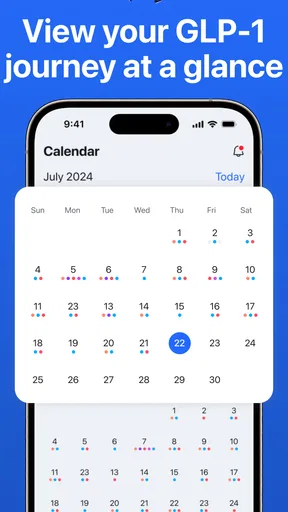
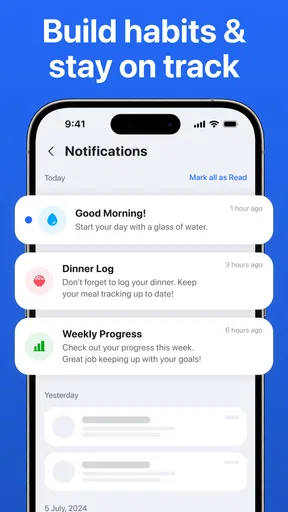
 Analysis by AppCompare
My main takeaway is that GLP-1 Tracker: Pep is most useful as a practical companion for keeping treatment details from slipping through the cracks. It focuses on reminders and personal tracking rather than trying to replace medical advice, which is the right role for an app in this sensitive area. I’d consider it if I wanted a more consistent record of my medication routine, but I wouldn’t treat its logs or educational material as a substitute for a conversation with my healthcare provider.
This is a free medical app from Shred Apps, LLC, with optional in-app purchases ranging from $9.99 to $39.99 per item. It has a 4.7 average from around 1,200 ratings, and has been installed over 10,000 times. That gives a prospective user a useful sense of its reach, though ratings alone can’t tell you whether its particular workflow suits your routine. The app is rated for everyone, runs on Android 8.0 or later, and its current version is 2.0.2.
What Makes It Useful Day to Day
The first thing that strikes you about GLP-1 Tracker: Pep is its clean and user-friendly interface. I mean, no one wants to deal with a cluttered app, especially when it’s supposed to make your life easier. The design is intuitive, making it super easy to navigate even if you’re not a tech wizard.
Tracking Made Easy
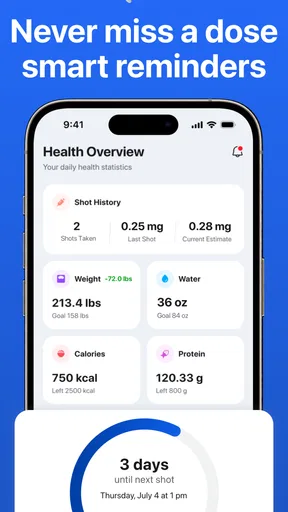
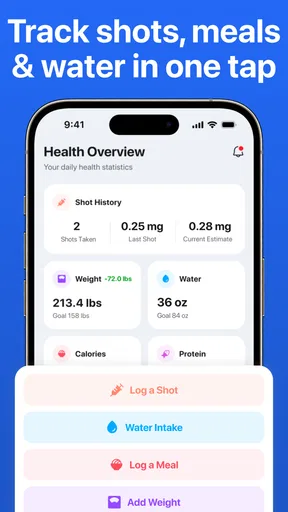
So, let’s talk features. The main highlight is the medication tracking. You can log your doses, set reminders, and even track your symptoms. It’s like having a personal assistant that’s dedicated to your health. I found the reminders particularly useful because, let’s face it, life gets busy, and it’s easy to forget those important doses. The app sends you a nudge right when you need it.
Another cool feature is the ability to log symptoms. This is a game-changer for anyone trying to understand how different doses affect them. You can easily record how you’re feeling, and over time, the app provides insights into your health patterns. It’s kind of like having a health journal right in your pocket.
Data at Your Fingertips
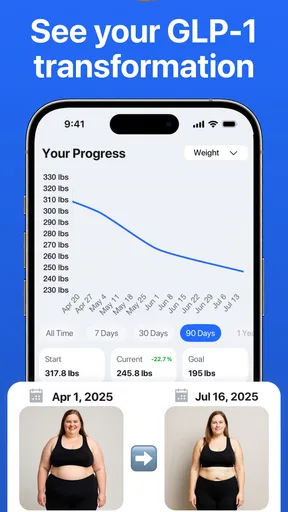
One of the things I appreciate most is the data visualization. The app allows you to view your medication history and health data in a clear, visual format. Whether it’s charts or graphs, having this information at a glance helps me stay informed about my health journey.
Plus, if you’re visiting your healthcare provider, you can easily pull up the app and show them your history. It’s all about making those appointments more productive and less about trying to remember every detail from the past few months.
Worth Reading Before You Choose

EA SPORTS FC Mobile 26 Is a Bigger Football Game, but It Takes Time

Flipboard Shows What News Apps Must Do Beyond the Feed

Switching to Android Auto Means Rethinking Your Driving Routine

Google Calendar Makes a Crowded Week Easier to Manage

Ludo King Makes the Most of the Minutes Between Plans

Baby Panda World Brings Quick Play to Modern Phones, but Its Game Library Feels Busy
The Little Extras
Beyond tracking and reminders, the app also offers educational resources. For those new to GLP-1 medications, these resources are a goldmine. You can learn about how the medications work, potential side effects, and tips for managing your treatment. It’s like having a mini-library at your disposal.
Oh, and let’s not forget about the community feature. You can connect with other users, share experiences, and get support. It’s nice to know you’re not alone on your health journey, and having a community can make a big difference.
Where a Tracker Helps—and Where It Doesn’t
The strongest case for using a dedicated tracker is not that it knows more than you or your clinician; it is that it can preserve small details you might otherwise forget. A dose taken during a rushed morning, a symptom that appeared later, or a question you meant to bring up at an appointment can be hard to reconstruct from memory. Keeping entries close together may make those details easier to review as a timeline.
A practical routine is to make a brief note when you record a dose, then add a symptom entry when something changes rather than trying to write a long account at the end of the week. Short, consistent notes are usually more useful than an elaborate diary that becomes a chore. If you notice a pattern, treat it as something to discuss with your healthcare provider, not proof that the medicine caused it or a reason to change your treatment on your own.
For an appointment, I’d use the history as a prompt sheet: open it beforehand, identify the entries I want to ask about, and explain the context in my own words. A tracker can help me remember what happened, but it cannot decide which details matter medically. That distinction keeps the app useful without asking it to do a clinician’s job.
A Realistic Routine, Not a Perfect One
Imagine a busy day when a normal reminder arrives while you are commuting, working, or caring for someone else. A notification can bring the task back to mind, but it is still up to you to follow your prescribed instructions and record what happened accurately. If you miss a reminder, the useful next step is to consult the guidance you were given by your healthcare professional, rather than guessing from an app log.
For symptom tracking, timing and plain language matter more than trying to diagnose yourself. A quick note about what you experienced and when can be more useful later than a vague entry such as “felt off.” If you are uncertain what to record, keep it factual and bring the question to your provider. The goal is to make the conversation clearer, not to turn everyday fluctuations into a conclusion about your treatment.
One trade-off with reminders is that they only help when they fit your real schedule. Before relying on them, I’d choose a time that is practical and check that notifications are enabled on the phone. A reminder that arrives at an inconvenient moment may be ignored repeatedly; a routine you can actually maintain is more valuable than a theoretically perfect schedule.
How It Compares With Other Ways to Keep Records
Compared with a paper calendar, a dedicated app can bring dose history, reminders, and symptom notes into one place instead of scattering them across pages. Compared with a general notes app, its focus on GLP-1 treatment may feel more relevant and less like building a tracking system from scratch. Those advantages matter most to someone who wants a regular prompt and an organized record, not simply a place to write occasional notes.
A calendar or reminder tool may still be the better choice if all you need is a basic alert and you do not want another health app. Paper may suit you better if you prefer keeping sensitive notes off your phone. And if you already use a clinician-recommended system that fits your care, there may be little reason to duplicate the same information here. Maintaining two records can create uncertainty if one is updated and the other is not.
The app’s combination of tracking, educational material, and a community gives it a broader role than a simple alarm. But broader is not automatically better for everyone. Some people want a quiet log and no social element; others may value peer experiences, while remembering that community posts are personal accounts rather than individualized medical guidance. I’d use that feature for a sense of connection, not for decisions about dosing or symptoms.
Who Should Consider It
I can see this being a good fit for someone prescribed a GLP-1 medication who wants help remembering doses and keeping a clearer record of how treatment feels over time. It may be especially handy for people who have trouble recalling details during appointments or who are beginning to notice questions they want to raise with their provider. The educational resources may also help a newcomer get oriented, provided they are used as general background rather than personal instructions.
It is less suitable for anyone looking for diagnosis, dose recommendations, or a replacement for professional follow-up. It may also be unnecessary if your medication routine is already simple to manage and your existing calendar works reliably. Before paying for any optional items, I’d first decide which part of the app I would actually use; a free starting point makes it easier to judge whether the routine adds enough value for you.
Because medication and symptom records are personal, I would also think about whether I’m comfortable entering them into a phone app. I’d review the app’s current privacy information and my device’s notification settings before adding details. That is a sensible check for any health tracker, especially if reminders could appear where other people might see them.
Final Thoughts
In a nutshell, GLP-1 Tracker: Pep is a solid option for anyone looking to streamline their medication management. It’s user-friendly, packed with useful features, and offers a bit of community support too. If you’re managing GLP-1 medications, this app is definitely worth a look.
While no app is perfect, the benefits of having everything you need in one place outweigh any minor hiccups you might encounter. So, give it a try and see how it fits into your health routine. You might just find it’s the perfect companion for keeping your health on track.
My more measured recommendation is to try it if the combination of dose reminders and personal notes addresses a real gap in your routine. Keep entries simple, use the history to prepare questions, and leave treatment decisions with your healthcare provider. If you only need a basic alert, a standard reminder may be enough; if you want a focused record and educational support, this app has a clearer reason to earn a place on your phone.
Pros
- User-friendly interface with intuitive navigation.
- Seamless syncing across multiple devices.
- Customizable alerts and reminders.
- Comprehensive data tracking and analysis.
- Integration with health apps for holistic view.
Cons
- Limited features in free version.
- Requires stable internet for data sync.
- Occasional glitches in data entry.
- No offline mode available.
- Subscription can be pricey for some users.
FAQs for GLP-1 Tracker: Pep
What is the main purpose of the GLP-1 Tracker: Pep app?
The GLP-1 Tracker: Pep app is designed to help users monitor and manage their GLP-1 medication usage. It provides tools for tracking doses, setting reminders, and logging health data. This app is particularly useful for individuals managing diabetes or weight-related conditions with GLP-1 medications.
Is the GLP-1 Tracker: Pep app compatible with both Android and iOS devices?
Yes, the GLP-1 Tracker: Pep app is available for download on both Android and iOS platforms. Users can find it in the Google Play Store for Android devices and the Apple App Store for iOS devices, ensuring accessibility across a wide range of smartphones and tablets.
Does the GLP-1 Tracker: Pep app require any specific permissions to function?
The app may require permissions such as access to notifications for setting reminders, and potentially access to health data if you choose to sync with other health apps. These permissions ensure the app can function effectively, but users have control over what they allow.
Can I customize reminders and notifications in the GLP-1 Tracker: Pep app?
Absolutely, the app allows users to set customized reminders for their medication schedule. You can adjust notification times and frequencies according to your personal routine, ensuring you never miss a dose and can manage your health more effectively.
Is my data secure when using the GLP-1 Tracker: Pep app?
The app prioritizes user privacy and data security. It employs encryption and secure storage methods to protect your personal health data. Users are encouraged to review the app’s privacy policy to understand how their data is managed and protected.


